
Too many chains to inspect
Let your rules narrow the watchlist before you start opening contracts one by one.
50% offIntroductory pricingVisualizer $10/mo · Pro $30/mo · All Access $50/mo
View plansScan your watchlist for cash-secured puts and covered calls, compare every contract on yield, breakeven and odds, then track the whole trade.
“Amazing software you have built.” John S. · “Your support is outstanding.” Mark C.
Seven days of every feature. Then continue on Visualizer, Pro or All Access.
Card required. Cancel before the trial ends to avoid being charged.
1 · Scan
Narrow the watchlist
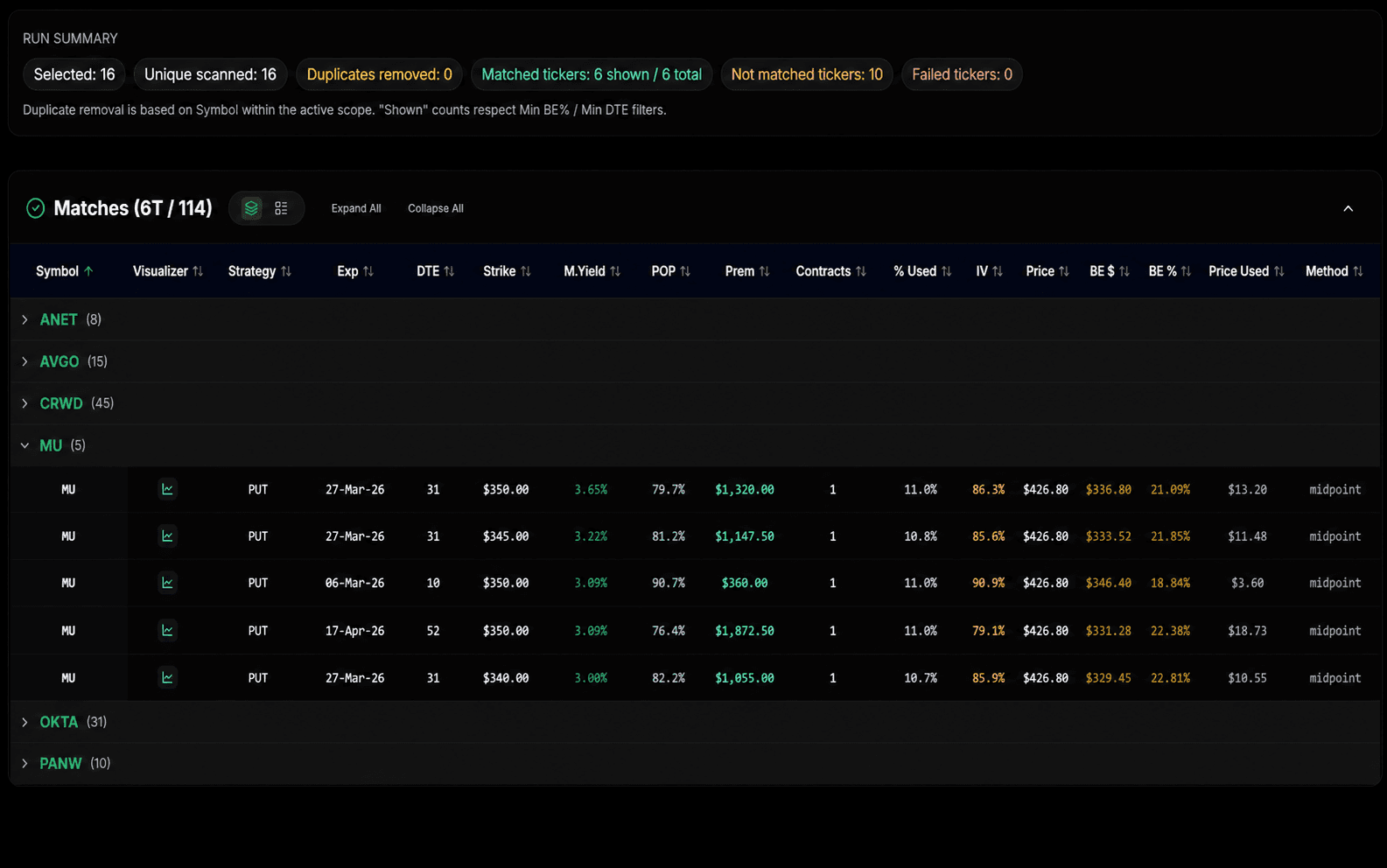
Run your criteria across the stocks you already follow and surface the setups worth a closer look.
The problem OMP was built to solve
The time disappears into everything around the trade: checking tickers, comparing expiries, normalising returns, reviewing risk and keeping track of what changed.
Let your rules narrow the watchlist before you start opening contracts one by one.
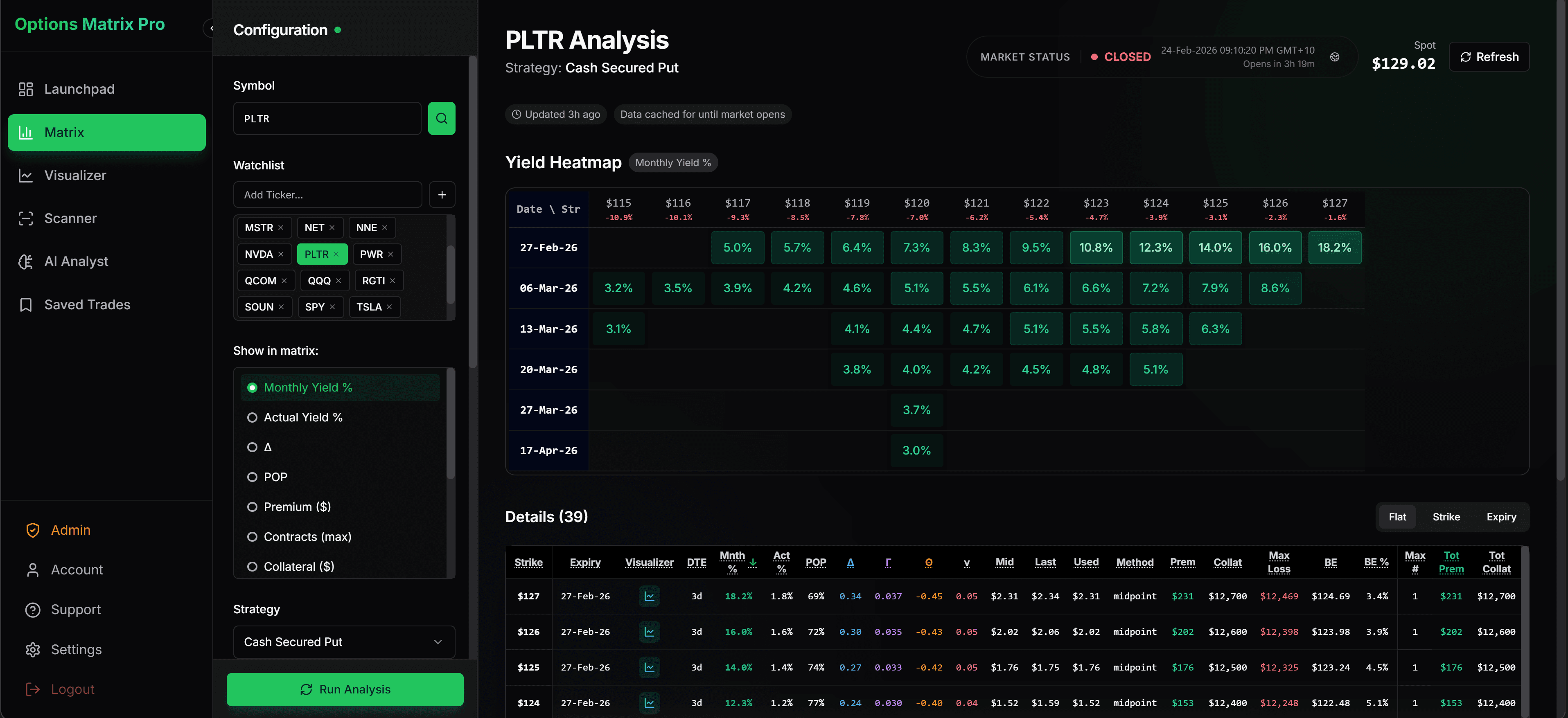
Put Monthly Yield %, premium, breakeven, DTE and probability side by side across strikes and expiries.
Keep research, modelling, thesis, fills, adjustments and outcomes in one workflow.
One connected workflow
01 · Scan
Run repeatable criteria across the stocks you already follow.
02 · Compare
Monthly Yield %, breakeven, probability and DTE in one view.
03 · Model
Adjust price, time, strikes and assumptions to see how the setup behaves.
04 · Track
Thesis, fills, adjustments, rolls and the final outcome.
OMP helps with the research and review. You make every trading decision.
Used by options traders
Hear from beta traders using OMP to bring research, modelling and trade tracking into one place.
I learned that profitable trading starts with mastering one strategy at a time. The wheel strategy gave me a solid foundation, and using Options Matrix Pro helped me progress faster and build more consistent execution and outcomes.
Jeff, Beta Trader
Options Matrix Pro feels like an all-in-one home for options traders. I can immediately see how it saves time and brings the workflow together.
Komey, Beta Trader
Options Matrix Pro brings the essential parts of OptionStrat, Options Samurai and a trading journal into one place. It gives me stronger functionality, a cleaner experience and better value than the alternatives—and the platform keeps improving. This is becoming the go-to platform for options traders worldwide.
Options YouTuber
On the product
On the support
Quotes from users’ own messages. Some early users received complimentary or discounted access.
Scan the watchlist
Run repeatable criteria across the stocks you already follow to surface contracts that match the rules you care about. Then send a result directly into the Visualizer for deeper review.
Scan the universe you actually trade.
Surface short-options opportunities using repeatable criteria.
Use the Advanced Strategy Scanner when you want to look beyond short puts and calls.
Run the same decision framework across many symbols instead of checking them manually.
Watchlist Scanners
Apply your criteria across many tickers at once
Find contracts that match your rules, then send the result directly into the Visualizer.
Instead of opening 50 option chains, start with the handful of setups that meet your criteria.
Options Matrix
Monthly Yield %, breakeven, POP and DTE in one view
Compare return and risk context on a consistent basis, then move directly into the Visualizer.
Compare the contracts
Different strikes and expiries can be difficult to compare from premium alone. The Options Matrix puts the numbers on a consistent basis so you can see the trade-offs more clearly.
Compare Monthly Yield %, premium, breakeven, probability, DTE and collateral across strikes and expiries in one view.
See the premium alongside a standardised Monthly Yield % so you can compare different expiries without judging contracts only by their headline dollar premium.
Build + model the strategy
Build a strategy or start with a preset, then change strikes, expiry, underlying price, volatility or modelled date and see payoff, expected move, probability and Greeks update together. Switch between graph and table views, then put market-price history beside the setup.
Strategy building
Start with a preset or build a supported multi-leg strategy, then adjust the setup as your assumptions change.
Expected move
Market-implied range beside your payoff.
Probability
POP context beside the position.
Graph + table views
The same setup visually and numerically across price and time.
Price history
The path the underlying and contracts took.
Model risk and reward
Change the setup, then see the payoff respond
Pressure-test P/L across price and time before you place the trade.
Model the questions that matter without rebuilding the setup across several tools.
Explore the VisualizerAfter entry
Save the setup. Record why you entered it. Add fills, adjustments and rolls. Backdate earlier trades when needed. Then review realised and unrealised P/L alongside the full campaign history.
Return without rebuilding every leg.
Keep the reason beside the position.
Keep fills, adjustments and rolls together.
See what happened without reconstructing it later.
Saved trade portfolio
See every live campaign and result
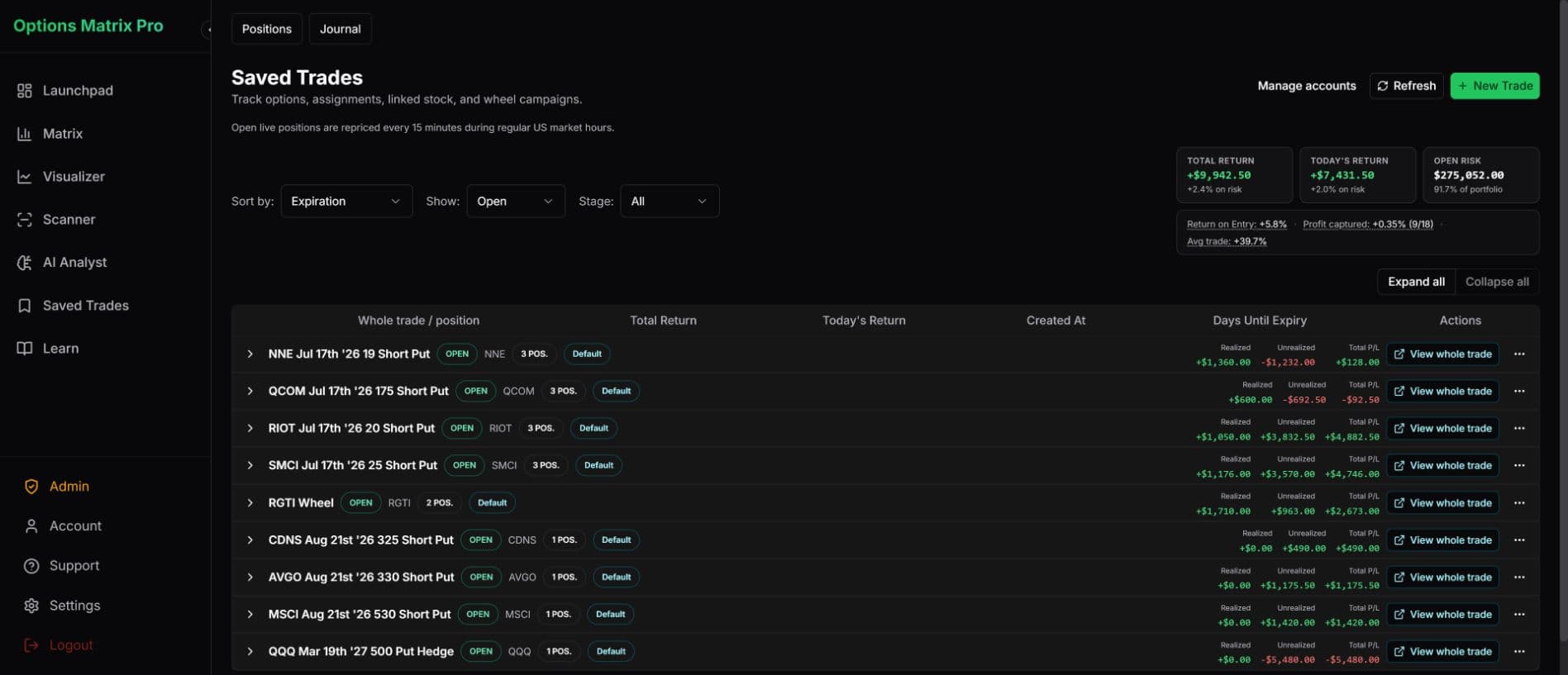
Review realised and unrealised P/L, risk and campaign status from one portfolio view.
See open campaigns, position history, realised and unrealised P/L and the decisions connected to each trade.
AI Analyst
Ask questions about your scan, matrix or setup
AI outputs are educational and informational only. You remain responsible for your own trading decisions.
Ask better questions
AI Analyst helps you question your own setup, assumptions and trade data using the information already inside OMP.
It is decision support, not a trade-recommendation engine. AI outputs are educational and informational only. You make every trading decision.
Why Options Matrix Pro exists
I built Options Matrix Pro because I wanted options trading to fit around the rest of my life.
I didn’t want to jump between option chains, spreadsheets, visualizers and brokerage screens just to decide whether a setup deserved more attention.
I wanted to scan the stocks I already followed, compare contracts on the same basis, see the risk clearly and keep the whole trade record together.
OMP is the workflow I wanted for my own trading.
Philip Fowdar — Founder, Options Matrix Pro
Choose how much of the workflow you want OMP to handle
Every paid signup starts with seven days of All Access so you can test the complete workflow before your selected plan begins.
Strategy modelling
Intro price
Now$10 USD/month
Build, adjust and pressure-test options strategies with live data.
7 days of All Access, then $10/month unless you cancel.
Connected workflow
Intro price
Now$30 USD/month
Add contract comparison, historical analysis and complete trade management.
7 days of All Access, then $30/month unless you cancel.
Discovery + workflow
Intro price
Now$50 USD/month
Add scanners that surface setups across the watchlists you already follow.
7 days of All Access, then $50/month unless you cancel.
Comparing OMP with OptionStrat?
OMP Visualizer is a powerful strategy-modelling workspace in its own right. Pro adds Matrix comparison, historical analysis and connected trade management. All Access adds watchlist discovery.
See current feature and pricing differences, with sources and checked dates.
Built with trader feedback
Expected-move overlays, historical mode, backdated trade entry, campaign journals, roll tracking and watchlist improvements are already in OMP because traders asked for them.
Expected-move overlays · Historical mode · Backdated trade entry · Campaign journals · Roll and adjustment tracking · Watchlist improvements
OMP is especially useful for traders who review multiple stocks or contracts and want a repeatable research process. Cash-secured puts, covered calls and wheel workflows are a strong fit for the Matrix and Short Options Scanner, while the Visualizer and Advanced Strategy Scanner also support multi-leg strategies.
Choose the plan you want to continue with when you sign up. Eligible verified accounts receive seven days of All Access. If you do not cancel during the trial, your selected plan begins when the trial ends.
Yes. A card is required for a paid trial. Cancel in Billing before the trial ends and your selected subscription will not be charged.
Yes. Paid plans include live market-data access for the supported OMP workflows. OMP currently uses ThetaData market data across the Matrix, Scanner, Visualizer and Saved Trades. Prices can change before execution, so confirm final order details with your broker.
Yes. Pro and All Access include historical analysis and historical trade entry so you can review earlier market conditions and add previous trades to a managed campaign.
Yes. Pro and All Access keep the trade thesis, fills, adjustments, rolls and related positions together so you can review the complete campaign later.
No. AI Analyst is decision support for reviewing your own data and assumptions. It does not provide personalised trade recommendations or financial advice. You make every trading decision.
OptionStrat is primarily known for options visualisation and strategy analysis. OMP combines live visualisation with the Options Matrix, scanners, historical analysis, AI Analyst, saved campaigns, journals, adjustments and portfolio tracking in one connected workflow.
See the full comparisonYes. You can manage your plan, payment details and cancellation from Billing after you sign in.
Ready to try the complete workflow?
Use All Access for seven days to scan a watchlist, compare contracts, model a setup and see how OMP keeps the trade together after entry.
Choose your continuing plan when you sign up. Card required. Your selected plan begins after the trial unless you cancel.
Options trading involves risk and is not suitable for all investors. OMP provides analysis and education only — not financial advice.