Compare Options Manually—or Let the Yield Matrix Do It for You
This free calculator checks two cash-secured puts when you enter every figure yourself. Options Matrix Pro automatically finds and compares opportunities across your watchlist.
The manual way
Copy each contract in by hand
Find a contract at your broker, enter five values twice, then repeat for every ticker and expiry. The free calculator below checks the maths; it is not the Options Matrix Pro workflow.
Options Matrix Pro
See the opportunities populated automatically
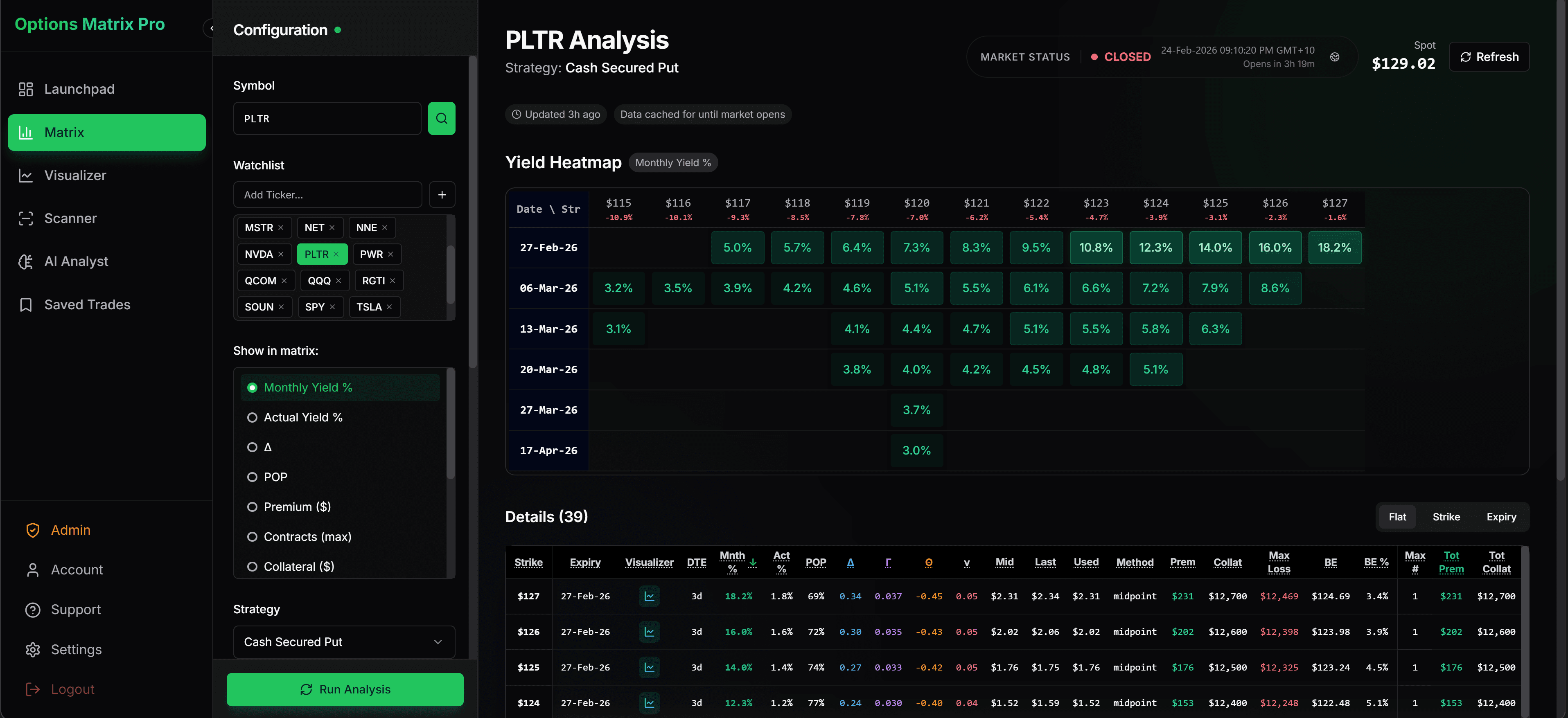
Run your watchlist and compare strikes, expiries, yield and probability in one Matrix view. Filter once, then shortlist the setups that match your rules.
See the automated MatrixThe manual way: compare two contracts
Copy the figures from your broker to check normalized yield, breakeven, downside distance and capital side by side. You supply every input; no market data is connected here.
Illustrative cash-secured put maths before fees and tax. Verify contract details with your broker. Educational and informational only - not financial advice.
| Result | Contract A | Contract B |
|---|---|---|
| Monthly yield | 2.21% | 2.14% |
| Annualized yield | 26.89% | 26.07% |
| Breakeven | $92.90 | $88.65 |
| Strike below spot | 5.00% | 10.00% |
| Capital required | $9,500.00 | $9,000.00 |
| Maximum premium | $210.00 | $135.00 |
Finished entering contracts by hand?
Let the Matrix populate and compare opportunities across your watchlist automatically.
Single decision surface
The yield matrix shows strikes and expirations in one grid so you can compare income tradeoffs without jumping between tabs or symbols.
Yield plus structure
Review monthly yield, premium, breakeven, and probability together to understand the full setup instead of only the headline premium.
Shortlist by rules
Set a target yield, probability threshold, and date window first, then use the grid to narrow to the contracts that fit your plan.
Best used as a comparator
The matrix is strongest when it is used to compare candidates side by side before you move into the scanner or Visualizer.
See the tradeoff without entering every contract
Options Matrix Pro populates strikes, expirations, yield, probability, breakeven, and sizing context in one view so better candidates stand out faster.
Quick Answers
Direct explanations for traders using the matrix as a comparison layer before deeper validation.
What is an options yield matrix meant to show?Answer
It shows multiple strike and expiration combinations in one view so you can compare yield, premium, breakeven, and probability without jumping between contracts.
Why use the matrix before choosing a contract?Answer
It makes tradeoffs visible early, which helps you rule out contracts that look attractive on premium alone but fail your probability or downside filters.
Is the matrix a final trade decision tool?Answer
No. It is best used as a comparison surface before you move the final candidates into deeper scenario testing and portfolio review.
Related Pages
Use these pages to move from comparing contracts to validating the trade.