Press release
Options Matrix Pro Is Built for Wheel Strategy Traders, From the First Cash-Secured Put to the Last Covered Call
Every job a wheel trader does, finding the put, choosing the strike, handling assignment, selling calls against the shares, rolling and knowing the true result, has a tool built for it, on live ThetaData quotes.
Highlights
- The Short Options Scanner searches a whole watchlist for cash-secured puts and covered calls against each ticker’s own rules.
- The Options Matrix ranks every strike and expiry by Monthly Yield %, with the expected move, earnings weeks and IV rank marked.
- Assignment, the shares, every covered call and every roll stay in one whole trade, with realized, unrealized and total profit and loss.
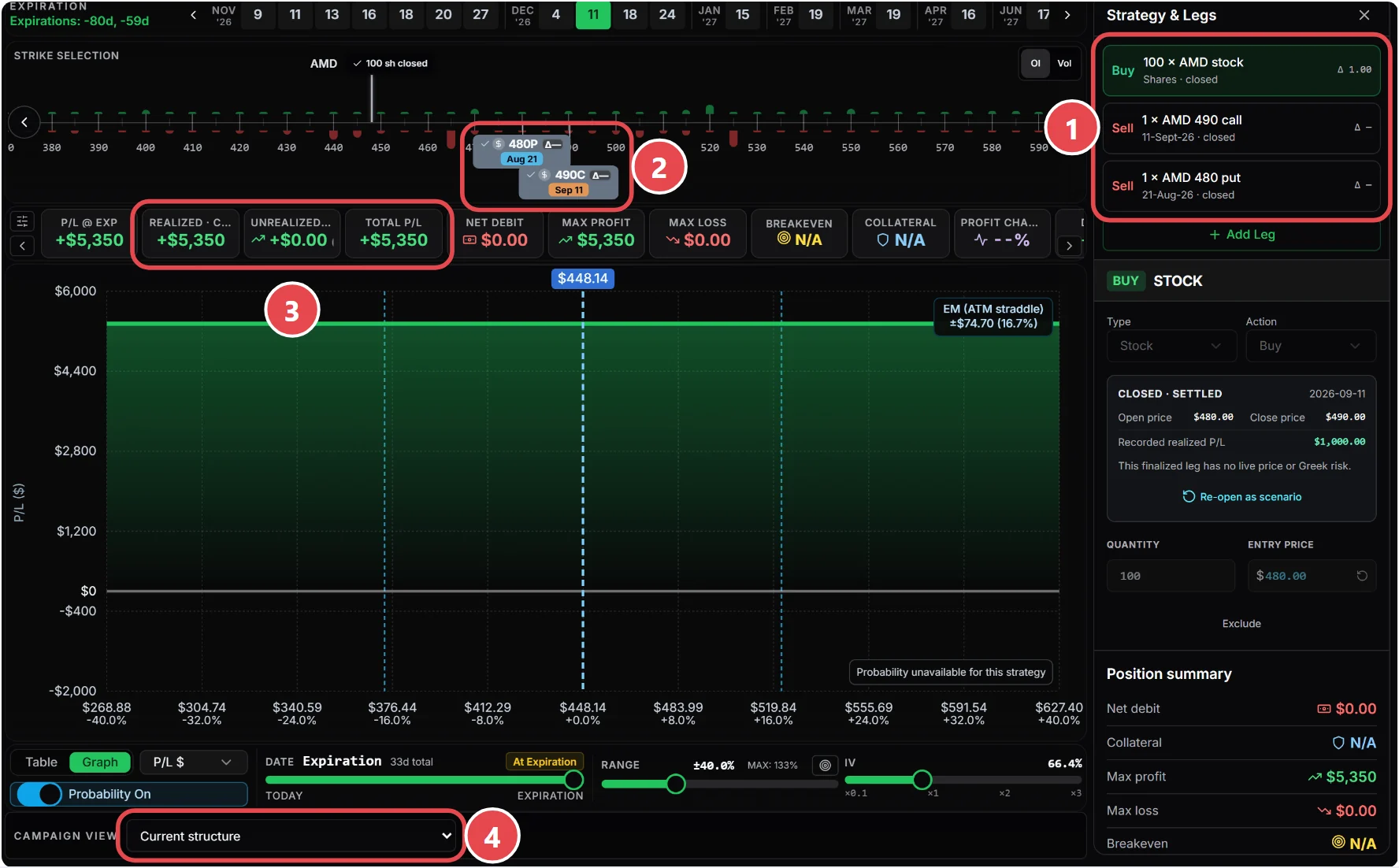
- A running breakeven since the first put falls with each premium collected.
- All Access subscribers can bring in trades from Interactive Brokers and tastytrade files, approving each change first.
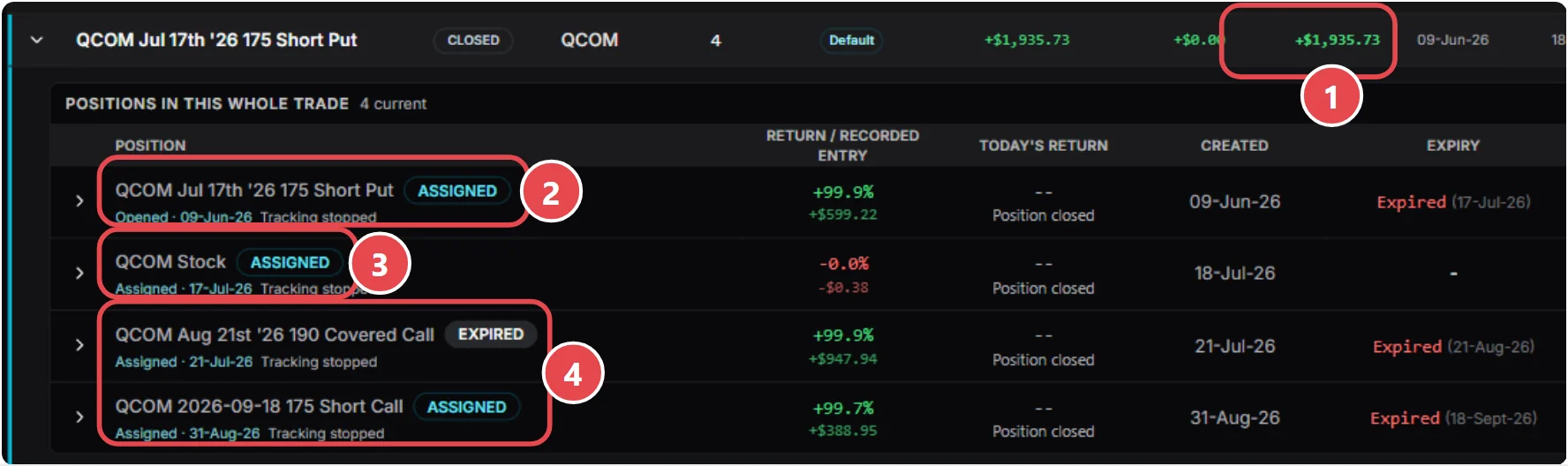
12 November 2026 – Options Matrix Pro, a web platform for self-directed options traders, today set out how it is built for traders who run the wheel strategy: selling cash-secured puts, taking assignment of the shares, then selling covered calls against them until the shares are called away. Every step of that cycle has a dedicated tool, and every tool works on the same live ThetaData quotes and feeds the next one.
Wheel traders tend to juggle a screener, a broker’s option chain, a payoff calculator and a spreadsheet, then struggle to say what a wheel has really returned once it has run for months. Options Matrix Pro was designed around the jobs a wheel trader actually does each week.
What a wheel trader needs, step by step
1. Find the put
The Short Options Scanner searches a whole watchlist for cash-secured puts. Each ticker keeps its own rule, such as a preferred strike, a minimum monthly yield, a minimum probability of profit and an optional delta range, and the scan checks up to three expiries per ticker within the trader’s chosen window. Auto Calibrate suggests strikes from open interest, gamma exposure and max pain. The same scanner finds covered calls once shares are held.
2. Choose the strike and expiry
The Options Matrix lays out every strike and expiry for a ticker on one grid, ranked by Monthly Yield %, so a 9-day put and a 45-day put can be compared fairly. Expected-move lines, earnings weeks, wide spreads and IV rank are marked on the grid, and it sizes the position to the trader’s capital.

3. Check the trade before placing it
One click opens the contract in the Strategy Visualizer, which shows the collateral, breakeven, probability of profit, the expected move on the chart and the put’s intrinsic and extrinsic value. Traders then place the order with their own broker.
4. Handle expiry and assignment
After expiry, Options Matrix Pro suggests Assigned or Expired from the stock’s closing price and records the outcome on the contract’s own expiry date, with that close saved. Confirming an assignment closes the put and opens 100 shares in the same whole trade, at the strike as cost basis, while the put’s premium stays as realized profit. An assignment can be reversed if it was entered by mistake.
5. Sell covered calls against the shares
Add covered call links a new call to the shares already held. Since 10 November 2026 a call saved on held shares joins that wheel by default instead of starting a new trade. Each call can be recorded as expired, closed, rolled or called away.
6. Roll when the trade needs it
Roll Compare prices every later expiry and strike as a net credit or debit on one grid. The trader enters the real fills, and the roll stays inside the same whole trade. When an expiry does not list the original spread width, Roll Compare offers the nearest one and warns if the maximum risk changes.
7. Know the true result
Saved Trades shows one row for each whole wheel, with realized, unrealized and total profit and loss across every put, share lot and call. Opened in the Visualizer with the Since inception view, the wheel shows a running breakeven that falls as each premium is collected. In the platform’s guide, an AMD wheel that started with a $480 put shows a breakeven of $446.30 after $33.70 of premium.
8. Bring trades in from the broker
All Access subscribers can import trades from an Interactive Brokers Activity Flex Query or a tastytrade transactions file, or ask their AI assistant to do it. Options Matrix Pro shows each proposed change in plain words and changes nothing until the trader approves it.
“Options Matrix Pro was built for wheel traders first. A wheel can run for months: a put, an assignment, then one covered call after another, and maybe a roll or two. If each of those lives in a different place, you never really know what the trade has returned. Here every step has its own tool, and the whole wheel stays together, so the number you see includes every premium and every roll.”
Recent additions for wheel traders
- A covered call saved on shares already held joins that wheel automatically (10 November 2026).
- Expiry outcomes are recorded on the contract’s own expiry date, with the stock’s closing price saved with the trade (9 November 2026).
- Broker trade import from Interactive Brokers and tastytrade files, approved change by change (8 November 2026).
- Step-by-step guides for every tool, including wheel tracking and rolls, with downloadable PDFs (10 November 2026).
- Roll Compare offers the nearest listed spread width when an expiry does not list the original one (29 October 2026).
Options Matrix Pro also publishes free, no-login covered call and cash-secured put calculators and a wheel strategy guide that walks through each stage of the cycle and its risks.
Availability and pricing
At current introductory prices, the Options Matrix and Saved Trades are included in Pro at $30 a month. The Short Options Scanner and broker trade import are included in All Access at $50 a month. Every eligible paid signup starts with a 7-day All Access trial; a card is required, and cancelling before day 7 costs nothing. Options Matrix Pro does not place orders: traders place their own trades with their broker and use Options Matrix Pro to research and record them.
About Options Matrix Pro
Options Matrix Pro (OMP) is a web platform where self-directed options traders scan a watchlist, compare contracts on the same basis, model the payoff and risk, and keep the trade record. It uses live market data from ThetaData and covers US-listed equity and ETF options and index options such as SPX, NDX and RUT. Plans start at $10 a month, and every eligible paid signup begins with a 7-day All Access trial. Options Matrix Pro does not place trades, give personal recommendations or act as a broker or adviser. Learn more at optionsmatrixpro.com.
Options involve risk and are not suitable for all investors. Estimated probabilities and modelled returns are not guarantees. Options Matrix Pro provides research and record-keeping software and general education, not investment advice.
Media contact
Philip Fowdar, Founder, Options Matrix Prooutreach@optionsmatrixpro.com
Logos, screenshots and company facts are in the newsroom.
###